Via the assignment of the order types (when using EBICS 2.x) or the Business Transaction Formats (BTFs, when using EBICS 3.0), you determine which tasks can be performed by a certain user with the bank access from the point of view of the application.
You can assign any order type/BTF to the bank access via the application. Whether they are in fact processed by the bank server depends on the configuration of the bank access on the bank server.
The following table shows which rights you require for which type of bank access and where you can find the bank access within the menu:
|
Bank access valid for |
Right (validity) |
Menu |
|
Your own user ID |
Protocol user bank accesses: read order types/BTFs(own) Protocol user bank accesses: edit order types/BTFs(own) |
, tab Bank accesses |
|
Your colleagues (all users of your own customer) |
Protocol user bank accesses: read order types/BTFs (customer) Protocol user bank accesses: edit order types/BTFs (customer) |
, choose colleague, tab Bank accesses |
You have the required rights with the required validity level (see table above).
To download order types/BTFs from a financial institution and update them at your own bank access, you need to have the right Protocol user bank accesses: assign order types/BTFs from bank server.
To be able to assign order types/BTFs to your own bank access, the bank access must be initialised.
|
1. |
Open the bank access you want to assign order types/BTFs to in edit mode. The table above describes how to navigate to the required bank access. |
||
|
2. |
The tab depends on the EBICS version for which your bank access is created: Change to the respective tab. |
||
|
3. |
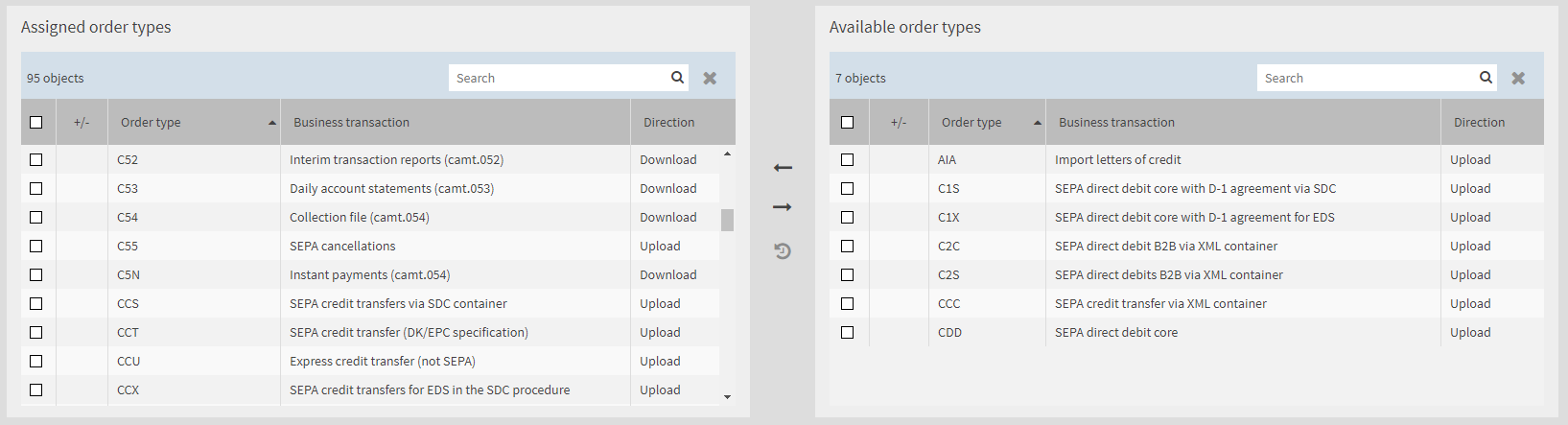
Switch to edit mode. In the left-hand column you can see which order types/BTFs are already assigned to the bank access. In the right-hand list you can see which order types/BTFs can be assigned to the bank access. The following figure shows the mask for a bank access which is set up for EBICS 2.5. |
||
|
|

|
||
|
4. |
Assign order types/BTFs to the bank access by removing order types/BTFs from the left-hand list (Assigned order types or Assigned BTFs) or adding order types/BTFs from the right-hand list. The editing of this linked list is described in detail in the section Working with linked lists. |
||
|
5. |
Save your changes. |